Which is the best trading journal?
Which is the best trading journal?

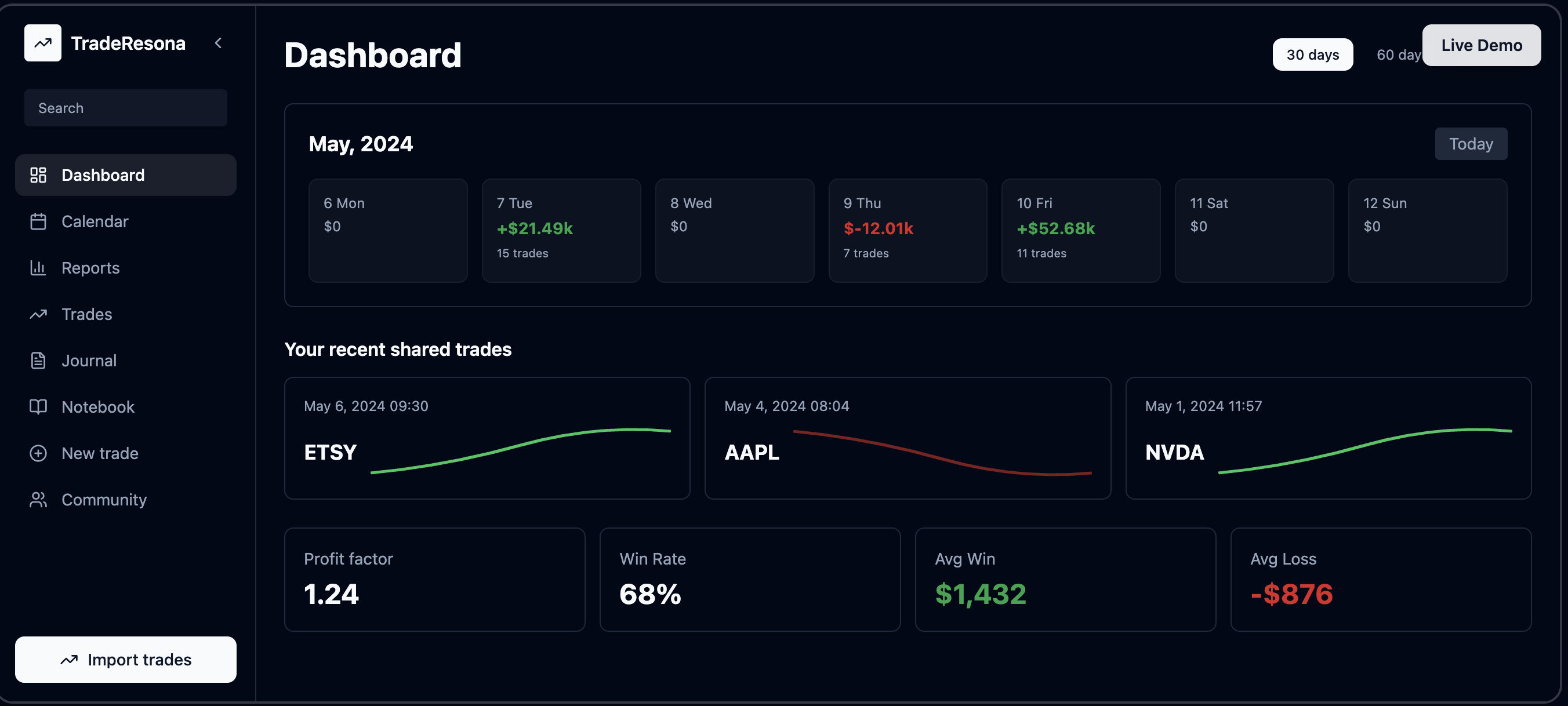
The best trading journal is the one you will actually use every day, and for most active retail traders that means a simple, clear, and focused tool like Traderesona. It removes the usual confusion, cuts down on manual work, and gives you a clean dashboard that tells you what is really happening in your trading.

Most new traders quit journaling because it feels like homework. Traderesona is built to fix that.


Why most trading journals fail traders

New and growing traders usually run into the same pain points:

  • Too much manual data entry

  • Confusing, cluttered dashboards

  • “All-in-one” apps that try to do everything

  • Hard to see simple things like win rate, P/L by day, or best setups

  • No clear link between behavior and results

So they stop journaling.
Then they keep repeating the same mistakes.


Why Traderesona is different

Traderesona is built for real active traders, not just for show.

Key points that make it stand out:

  • User friendly dashboard
    You see your P/L, win rate, and key stats at a glance, not buried in menus.

  • Made for stocks, options, futures, and forex
    Supports the markets most active traders actually use.

  • Multi account support
    Pro users can add multiple accounts and see everything in one place, instead of juggling logs across brokers.

  • AI powered insights
    The platform helps you spot patterns, not just store data.

  • Behavior focused
    It is built around real trader problems like overtrading, revenge trading, and inconsistent setups.

Where many tools feel like generic spreadsheets with charts, Traderesona is focused on helping you trade better, not just track numbers.


Traderesona’s main features

Here is how Traderesona makes journaling easier and more useful.

1. Clean, easy to use dashboard

New traders get overwhelmed by busy charts. Traderesona gives you:

  • Simple performance overview

  • Clear P/L trends

  • Quick view of recent trades and stats

  • No bloated menus or confusing widgets

You can log in and understand your day in seconds.


2. Multi account tracking

Many traders use:

  • One account for day trades

  • One account for swing trades

  • One account for futures or options

Traderesona lets premium / pro users add multiple accounts and manage them inside one dashboard, instead of fighting with different logs and spreadsheets.

You can see:

  • Performance by account

  • Combined performance across all accounts

  • How each style affects your overall results


3. AI powered trading analytics

Instead of just storing trades, Traderesona helps you understand them.

The system is built to help you:

  • Spot patterns in winning and losing trades

  • See when you break your rules

  • Notice when your trading changes after big wins or losses

  • Get simple, direct insights instead of vague “tips”

This speaks to the real problems new traders have, like overtrading, chasing, and ignoring their own plan.


4. Behavior and setup focused journaling

Traderesona is not only about P/L. It helps you track:

  • Setup types

  • Time of day

  • Mistakes (like FOMO, revenge, boredom)

  • Notes on what you were thinking

This lets you answer questions like:

  • “Which setup really makes me money?”

  • “What time of day hurts me the most?”

  • “What mistakes cost me the most over the last month?”


5. Simple workflow that fits real life

Most traders do not want a complicated system. They want:

  • Quick logging

  • Clear stats

  • A routine they can follow every day

Traderesona is built around that:

  • Easy trade entry or import

  • Fast tagging and note taking

  • Simple daily or weekly review from the dashboard

It feels more like part of your trading routine and less like homework after the close.


How Traderesona compares to common alternatives

Paper notebooks

  • Good for quick notes

  • Bad for stats, filtering, or long term tracking

Spreadsheets

  • Flexible, but you must build everything

  • Easy to break formulas

  • Time consuming to maintain

Generic journal apps

  • Not built for traders

  • No real trading metrics

  • Hard to adapt to stocks, options, futures, and forex

Traderesona

  • Designed for active traders from the start

  • Handles multiple accounts and instruments

  • Focuses on patterns, behavior, and repeatable edges

  • Gives you a dashboard that feels like it was built for how traders actually think


Summary

The “best” trading journal is the one that fits your style, is simple enough to use every day, and powerful enough to show you real patterns in your trading. Traderesona is built specifically for active traders, with a clean and friendly dashboard, multi account support, and behavior focused analytics that speak directly to the pain points new and growing traders face. You can use a dedicated platform like Traderesona at traderesona.com to log trades, study your performance, and start tracking your trades today in a way that actually helps you improve.

AI-Powered Trading Journal with Auto-Sync

Sync Your Trades Automatically. See the Patterns Behind Your Performance.

TradeResona is an AI-powered trading journal with auto-sync that turns your trade history into clear insights across wins, losses, setups, and risk.

Create Free Account | No credit card required | Read-only broker connections

Your Trade History Should Show You More Than P&L

Automatic Trade Import

Bring supported broker activity into one journal without repeatedly entering trades by hand.

Pattern Review

Compare setups, timing, results, and risk across your historical trades.

Multi-Asset Support

Stocks, Options, Futures, Forex - Track all your trades in one unified platform.

Read-Only Connections

Supported broker connections import trading activity without permission to place trades.

AI-Powered Trading Journal

Pattern Recognition

AI-assisted tools help organize observations from your actual trading history for educational review.

  • Compare winning and losing results across historical trades
  • Review your historical entry and exit timing patterns
  • Position sizing calculations based on risk inputs you provide
  • Optional chart review for documenting setup observations

Advanced Analytics & Performance Reports

Get detailed analytics with breakdowns by symbol, time, and strategy. Analyze your patterns and review your trading data.

Symbol Performance Analysis

Deep dive into your performance on each symbol you trade. Identify which stocks, options, or futures work best for your strategy.

Time-Based Performance Analysis

Analyze the best times to trade based on your historical performance. Review your schedule and your historical patterns.

Risk & Position Sizing

Understand your risk profile and analyze position sizing strategies while controlling downside risk.

Complete Trading Journal Features

Trade Tracking

Log every trade with detailed entry, exit, and performance metrics. Import from your broker or enter manually.

Performance Analytics

Comprehensive analytics showing win rate, profit factor, average win/loss, and more key trading metrics.

Trading Journal

Document your trading psychology, strategy notes, and lessons learned for continuous improvement.

Calendar View

Visualize your trading activity and performance across time with intuitive calendar visualization.

Goal Tracking

Set and track trading goals, monitor progress, and stay accountable to your trading plan.

Community Features

Connect with other traders, share insights, and learn from the community's collective experience.

Supported Brokers & Platforms

Import your trades seamlessly from these popular brokers:

TD Ameritrade
Interactive Brokers (IBKR)
E*TRADE
Charles Schwab
Fidelity
Robinhood
Webull
TastyTrade

Simple, Transparent Pricing

Free Plan

$0/month

  • Track up to 50 trades per month
  • Basic analytics and reports
  • Community access
  • Manual trade entry

Pro Plan

$19/month

  • Unlimited trades
  • Advanced analytics & reports
  • AI Trading Coach
  • Broker imports
  • Priority support

Premium Plan

$49/month

  • Everything in Pro
  • Advanced AI insights
  • Custom reports
  • API access
  • White-glove onboarding

Frequently Asked Questions

What is TradeResona?

TradeResona is an AI-powered trading journal and analytics platform designed for active traders. It helps you track trades, analyze performance, identify patterns, and review your trading data across stocks, options, futures, and forex.

How does the AI Trading Coach work?

Our AI analyzes your trading history to identify patterns, trends, and areas to review. It provides personalized insights on entry/exit timing, position sizing, risk management, and helps you understand your trading psychology.

Can I import trades from my broker?

Yes! TradeResona supports imports from major brokers including TD Ameritrade, Interactive Brokers, E*TRADE, Charles Schwab, Fidelity, Robinhood, Webull, and TastyTrade. You can also manually enter trades.

Is my trading data secure?

Supported broker connections are read-only for trade import. Review the privacy policy and security page for details about data handling.

What asset types are supported?

TradeResona supports stocks, options, futures, and forex trading. Track all your trades across multiple asset classes in one unified platform.

Ready to See the Patterns in Your Trades?

Create a free account to organize your trade history and review performance patterns with AI-powered insights.

Create Free Account - No Credit Card Required