AI Chart Analyzer: Upload a Chart, Get a Trade Plan
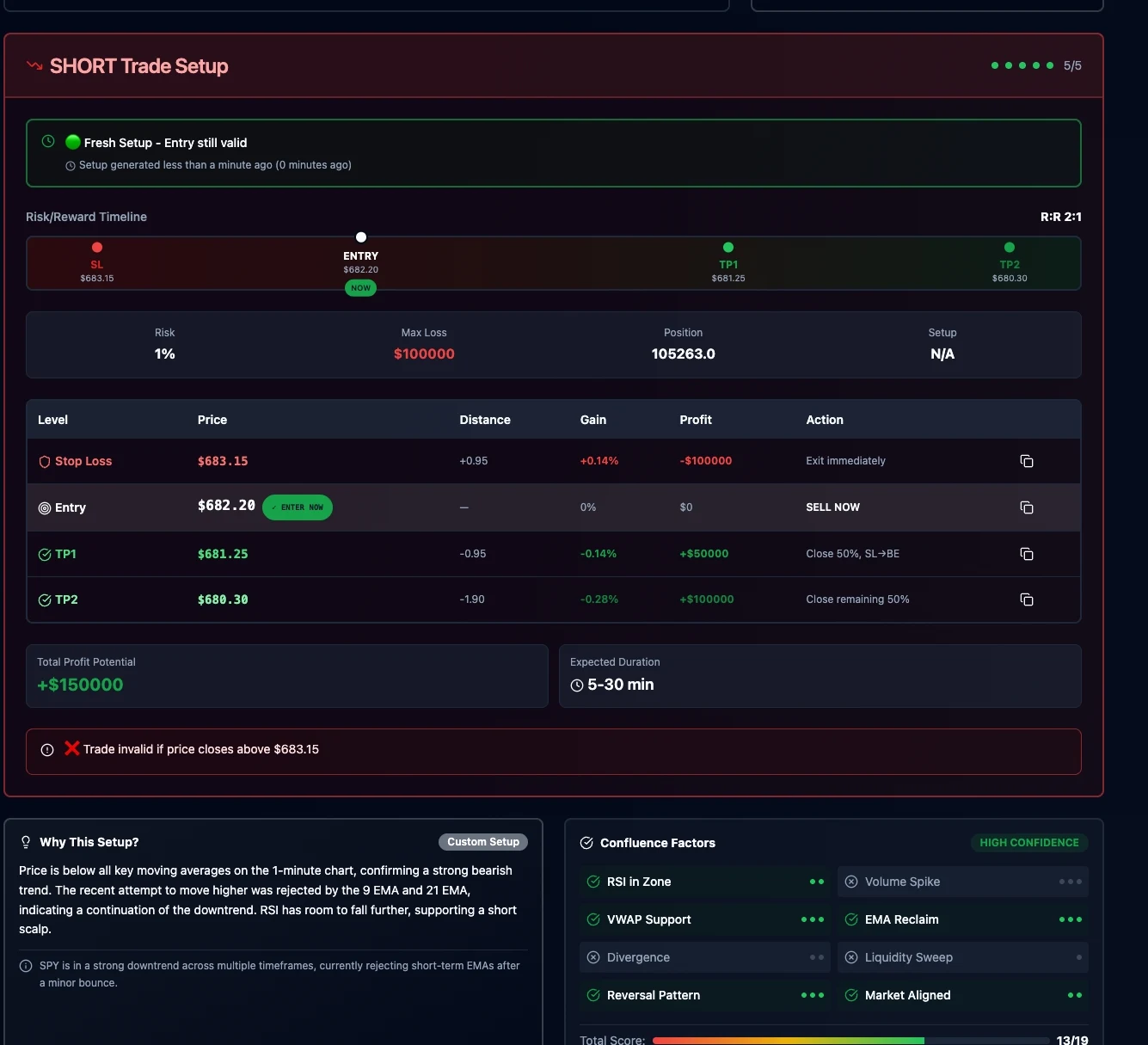
Resona reads your chart and breaks down the trend, key levels, confluence, invalidation, and risk-to-reward, then sizes the position for you to review.
Try the AI chart analyzer on your own chart
Upload a chart screenshot and get a free preview of the trend, bias, and setup. Sign up to unlock the full trade plan. Educational analysis only, not financial advice or a trade signal.
What the AI chart analyzer reviews
Trend and market structure
Reads the direction, higher highs and lower lows, and whether the chart supports the side you want to trade.
Support and resistance
Marks the key price levels on your chart that the setup depends on.
Confluence factors
Lists what lines up with the idea and what works against it.
Entry and invalidation
Defines where the setup is confirmed and the level where the idea is wrong.
Risk-to-reward
Compares the stop distance to staged targets.
Position sizing
Turns your account size and risk per trade into a position size and stop distance.
How to analyze a trading chart with AI
Define the setup
Pick the market, symbol, direction, and trading style: scalp, day trade, or swing trade.
Upload your chart
Add a screenshot of your chart from TradingView, thinkorswim, MetaTrader, or any charting platform.
Review the AI analysis
Resona reads the chart and returns the setup logic, key levels, confluence, and invalidation.
Plan the risk
Get position size, stop distance, and take-profit targets, then test the idea in a simulator.
AI Chart Analyzer FAQ
Can I try the AI chart analyzer for free?
Yes. Upload a chart to get a free Trade Ideas Lite preview with the trend, bias, and setup forming. Sign up to unlock the full analysis with entry, invalidation, targets, risk-to-reward, and position size.
What is an AI chart analyzer?
An AI chart analyzer reads a screenshot of a price chart and returns a structured technical review. TradeResona's analyzer looks at trend, market structure, support and resistance, confluence, invalidation, and risk-to-reward, then helps you size the position.
Which markets can I analyze?
You can analyze stock, forex, crypto, futures, and options charts, for scalp, day trading, or swing trading setups.
Which charting platforms does it work with?
Any platform you can screenshot, including TradingView, thinkorswim, MetaTrader 4 and 5, NinjaTrader, Webull, and your broker's own charts.
Does the AI give buy or sell signals?
No. The analyzer is an educational review tool. It explains the setup, the levels it depends on, and where it would be invalidated so you can make your own decision. Test ideas in a paper-trading simulator before risking capital.
How many charts can I analyze?
Each chart analysis uses AI credits. Pro includes 50 AI credits each month and Premium includes 200.
Can I cancel anytime?
Yes. There are no long-term contracts. Cancel anytime from your account settings.
AI-Powered Trading Journal with Auto-Sync
Sync Your Trades Automatically. See the Patterns Behind Your Performance.
TradeResona is an AI-powered trading journal with auto-sync that turns your trade history into clear insights across wins, losses, setups, and risk.
Create Free Account | No credit card required | Read-only broker connections
Your Trade History Should Show You More Than P&L
Bring supported broker activity into one journal without repeatedly entering trades by hand.
Compare setups, timing, results, and risk across your historical trades.
Stocks, Options, Futures, Forex - Track all your trades in one unified platform.
Supported broker connections import trading activity without permission to place trades.
AI-Powered Trading Journal
Pattern Recognition
AI-assisted tools help organize observations from your actual trading history for educational review.
- Compare winning and losing results across historical trades
- Review your historical entry and exit timing patterns
- Position sizing calculations based on risk inputs you provide
- Optional chart review for documenting setup observations
Advanced Analytics & Performance Reports
Get detailed analytics with breakdowns by symbol, time, and strategy. Analyze your patterns and review your trading data.
Symbol Performance Analysis
Deep dive into your performance on each symbol you trade. Identify which stocks, options, or futures work best for your strategy.
Time-Based Performance Analysis
Analyze the best times to trade based on your historical performance. Review your schedule and your historical patterns.
Risk & Position Sizing
Understand your risk profile and analyze position sizing strategies while controlling downside risk.
Complete Trading Journal Features
Trade Tracking
Log every trade with detailed entry, exit, and performance metrics. Import from your broker or enter manually.
Performance Analytics
Comprehensive analytics showing win rate, profit factor, average win/loss, and more key trading metrics.
Trading Journal
Document your trading psychology, strategy notes, and lessons learned for continuous improvement.
Calendar View
Visualize your trading activity and performance across time with intuitive calendar visualization.
Goal Tracking
Set and track trading goals, monitor progress, and stay accountable to your trading plan.
Community Features
Connect with other traders, share insights, and learn from the community's collective experience.
Supported Brokers & Platforms
Import your trades seamlessly from these popular brokers:
Simple, Transparent Pricing
Free Plan
$0/month
- Track up to 50 trades per month
- Basic analytics and reports
- Community access
- Manual trade entry
Pro Plan
$19/month
- Unlimited trades
- Advanced analytics & reports
- AI Trading Coach
- Broker imports
- Priority support
Premium Plan
$49/month
- Everything in Pro
- Advanced AI insights
- Custom reports
- API access
- White-glove onboarding
Frequently Asked Questions
What is TradeResona?
TradeResona is an AI-powered trading journal and analytics platform designed for active traders. It helps you track trades, analyze performance, identify patterns, and review your trading data across stocks, options, futures, and forex.
How does the AI Trading Coach work?
Our AI analyzes your trading history to identify patterns, trends, and areas to review. It provides personalized insights on entry/exit timing, position sizing, risk management, and helps you understand your trading psychology.
Can I import trades from my broker?
Yes! TradeResona supports imports from major brokers including TD Ameritrade, Interactive Brokers, E*TRADE, Charles Schwab, Fidelity, Robinhood, Webull, and TastyTrade. You can also manually enter trades.
Is my trading data secure?
Supported broker connections are read-only for trade import. Review the privacy policy and security page for details about data handling.
What asset types are supported?
TradeResona supports stocks, options, futures, and forex trading. Track all your trades across multiple asset classes in one unified platform.
Ready to See the Patterns in Your Trades?
Create a free account to organize your trade history and review performance patterns with AI-powered insights.
Create Free Account - No Credit Card Required